
BAND - App for all groups
NAVER Corp.Social
4.87.39K Reviews
- Version
- 31.0.4
- Installs
- 50.00M
- Age Rating
- Teen
Screenshots
Our Review of BAND - App for all groups
 Analysis by Appyee
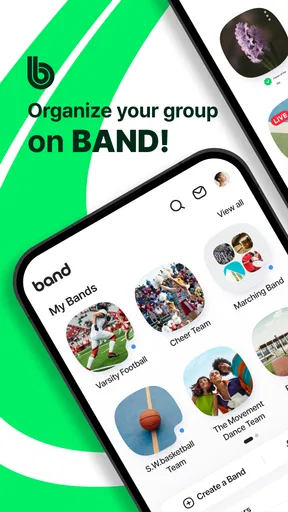
I first came across BAND as a social app for groups rather than a general-purpose feed, and that distinction still shapes my opinion of it. It is built around keeping a team, club, class, family circle, or activity group in one shared space. Instead of asking everyone to follow the same public timeline, it gives a group a place to organize conversations and keep relevant updates together.
That approach makes the app especially interesting when connectivity is part of the problem you are trying to solve. A busy group chat can become difficult to search, while a public social network is usually too broad for practical coordination. BAND sits between those two experiences. It feels more structured than a normal messaging thread, but less formal than a workplace project tool.
I reviewed it as a free social app from NAVER Corp., and my overall impression is positive. The large community around it is reflected in an average rating of 4.8 from around 777 thousand ratings, with more than 50 million installs. Those figures do not automatically make an app good, but here they match what I found: BAND is focused, flexible, and particularly useful when several people need to stay aligned without mixing their plans into every other conversation.
How BAND feels when the connection matters
When a group depends on timely updates, I find it helps to decide in advance which messages need an immediate response and which can wait for people to reconnect. A clear handoff—such as restating the full revised plan rather than posting only “change of time”—makes BAND’s shared space easier to use after interruptions. That small habit also shows where connection alone cannot solve a group’s coordination problems.
One group space is more useful than a crowded chat
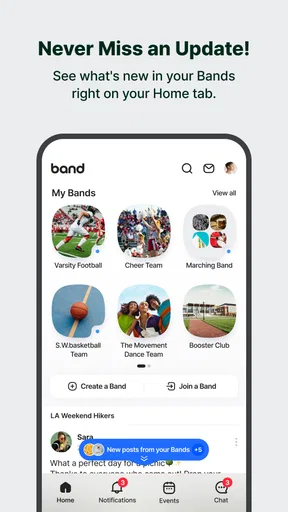
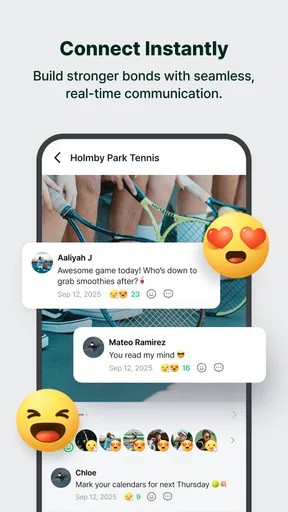
The main strength is not simply that people can communicate. Most social apps already do that. The useful part is placing a group’s conversations, announcements, schedules, and shared activity in a setting designed for that group. When I think about a sports team, study group, volunteer circle, or extended family, the advantage becomes easy to understand: the conversation has a clear home.
That organization changes how I use the app. In a typical chat, an important message can disappear under jokes, reactions, photos, and side discussions. With BAND, I can treat the group as an ongoing noticeboard as well as a conversation. That makes it easier to return after being away for a while and understand what has changed.
The experience is strongest when members agree on how to use the space. A team can keep practical updates together, while a family group can separate everyday conversation from plans that everyone needs to notice. The app does not remove the need for group discipline, but its structure gives people a better chance of finding the right information later.
Connectivity changes the rhythm, not just the speed
Because BAND is a social service, its usefulness depends on a working connection for normal communication and updates. That matters in real life. A message sent while commuting, a schedule change made before practice, or a photo shared from an event all rely on the app being able to reach the service and refresh the group.
I would not judge it like a notes app that is primarily useful without a network. BAND makes sense when the value comes from people seeing the same information and responding to it. If your group is spread across different places, the connection is what turns a static space into a living one. When the network is weak, the app cannot provide the same immediate feeling of coordination.
That dependency is not a reason to avoid it, but it should influence your expectations. I would not use it as the only place for an emergency instruction or a detail that must be available regardless of reception. For ordinary planning, discussion, and group updates, it works well; for critical information, I prefer keeping a backup in a format I can reach independently.
A realistic day with a team
Imagine a local team preparing for a weekend event. The organizer posts the meeting details, members check the plan, and someone adds a question about transport. Later, a change is shared with the group. In a normal one-to-one messaging setup, that information may be scattered across separate chats. In BAND, the team has a central place to return to, so a member who was busy earlier can catch up without asking everyone to repeat the same details.
The same pattern works for a class project. Instead of relying on one student to forward every update, the group can keep its discussion in a shared space. The important benefit is not that every person responds instantly. It is that the conversation remains attached to the group and can be revisited when members have a stable connection.
There is also a social advantage. People do not need to exchange personal contact details with every member simply to participate in the group’s activity. That can make BAND a comfortable choice for clubs and temporary teams, especially when the group needs coordination but does not want to turn every participant into a contact across other services.
Using it comfortably on a phone
I found the mobile-first design natural for quick checks. A phone is the device most people already carry to practice, class, work, or family events, so the app fits situations where a desktop-style tool would feel excessive. You can check what the group has discussed, respond when you have a moment, and return to the same space later.
Still, mobile convenience has a trade-off. Long discussions can become tiring to read on a small screen, especially when several topics are mixed together. I get better results when I keep messages focused and avoid turning every minor thought into a separate interruption. The app can organize a group, but members still need to write clearly.
For people who move between Wi-Fi and mobile data during the day, I recommend checking important updates before leaving a reliable connection. That is not a special feature claim; it is simply sensible behavior for any connected social service. If a schedule or meeting point matters, I would also keep a personal note of it rather than assuming I can always reopen the group at the exact moment I need it.
Where the mobile experience can feel less comfortable
Large groups create their own friction. More members usually mean more activity, and more activity can make it harder to distinguish a useful announcement from casual conversation. A group that begins with a clear purpose may gradually collect unrelated posts, making the original structure less effective.
This is where I think the app suits organized communities better than completely unmoderated ones. A team leader, teacher, or group owner should set expectations early: where announcements belong, what deserves a reply, and which topics should be kept separate. Without that guidance, BAND can start to resemble the crowded chats it is meant to improve.
Another consideration is attention. A dedicated group app can make coordination easier, but it also creates another place to check. If your friends or coworkers already use several platforms, convincing everyone to add BAND may be harder than installing it yourself. The app is only valuable when the group actually adopts it.
What happens when the connection fails?
Connectivity problems are most frustrating when they arrive at the wrong time. A message may not appear when expected, a response may be delayed, or a group member may assume that everyone has seen an update when some people have not. In those moments, the weakness is not unique to BAND, but the group’s dependence on one shared online space becomes more visible.
My practical advice is to separate routine coordination from time-sensitive safety information. Use BAND for planning and communication, but do not make it the sole backup for a meeting location, travel instruction, or urgent change. If the group is gathering somewhere with uncertain reception, agree in advance on a fallback method. That simple habit prevents a connection problem from becoming a coordination failure.
When service returns, the important question is whether the group can recover its context. This is where a structured group space is preferable to a loose stream of private messages: members have a common place to check what they missed. Recovery still depends on people posting clearly, but the shared history gives everyone a better starting point than a chain of fragmented conversations.
Keeping discussions recoverable
I recommend using short, descriptive messages for anything the group may need later. “Saturday plan” is more useful than a vague reply buried in a long exchange. If a detail changes, restate the complete updated information instead of assuming that everyone will connect it to an earlier message. This is a small workflow improvement, but it makes the app much more reliable after interruptions.
It also helps to avoid using one group for every purpose. A family may want a general space and a separate space for a trip. A club may need one area for announcements and another for casual conversation. The exact setup depends on the group, but separating subjects reduces the amount of scrolling required when someone reconnects after several hours.
These habits reveal an important trade-off: BAND gives groups room to organize themselves, but that flexibility can become clutter if nobody takes responsibility for structure. I see this as a manageable limitation rather than a design failure. The app provides the container; the group still has to decide how information should flow.
Using BAND without wasting mobile data
For data-conscious users, the key is to treat the app as a shared communication space rather than an endless media feed. Text-based updates are generally easier to check during a short mobile-data session than a group full of large photos and repeated video posts. If your group shares a lot of media, review those items when you are on a connection you trust instead of opening everything automatically while traveling.
I also prefer reading the most important updates first and leaving casual browsing for later. That sounds obvious, but social apps encourage people to keep scrolling. In BAND, a quick check can be efficient when I enter with a purpose: look for a new announcement, confirm a schedule, or answer a direct question. It becomes less efficient when I treat every group as a feed that must be consumed continuously.
Groups can help each other here. Members should avoid reposting the same image several times and should put essential details in text rather than hiding them inside an image. That improves accessibility as well as data use. It also means a person with a slow connection can understand the update without waiting for every attachment to load.
Privacy, audience, and the right kind of community
BAND carries a Teen content rating, which is a useful reminder that it is a broad social product rather than a private family notebook. Before joining or creating a group, I would think carefully about who can participate, what information is being shared, and whether the group’s purpose is clear. A private-feeling community still needs sensible boundaries.
The app is a good match for people who want a defined social circle instead of a public audience. It is less compelling if your main goal is discovering strangers, following celebrities, or consuming a broad stream of public content. BAND’s value comes from an existing group with a reason to stay connected.
Parents, teachers, organizers, and club leaders should also consider how much responsibility they want to take for group management. A dedicated space can reduce confusion, but it may require occasional cleanup and reminders. If nobody wants to set norms, a simpler messaging tool may feel easier at first, even if it becomes messier later.
How it compares with familiar alternatives
Compared with a standard group messenger, BAND feels better suited to ongoing communities. A messenger is often faster for a quick question or urgent one-to-one exchange, and people may already have it installed. BAND becomes more attractive when the group needs continuity, clearer separation from personal chats, and a place that remains centered on one shared activity.
Compared with a public social network, it is more focused. You are not joining primarily to browse a huge audience or build a public profile. That can feel quieter and more useful, but it also means there is less value if you do not already belong to an active group. The app does not replace a public network; it solves a different social problem.
Compared with a formal collaboration platform, BAND is more approachable for casual groups. A volunteer circle or family may not want project-management terminology, complicated setup, or a work-oriented atmosphere. On the other hand, a professional team that needs detailed task ownership, document control, or formal reporting may be better served by a dedicated workplace tool.
My rule is simple: choose BAND when the people are known, the group will continue meeting or communicating, and shared context matters. Choose a normal messenger for very small, fast exchanges. Choose a more formal platform when accountability and project tracking matter more than friendly group interaction.
Version, cost, and what to expect
The app is free to install and use, which lowers the barrier for a club or family trying to bring everyone into one place. There are in-app purchases ranging from about $1.68 to $53.09 per item, so I would check what any optional purchase provides before paying. The free entry point is the important part for most groups, but the presence of purchases means the experience is not defined solely by a no-cost model.
The current version is 29.2.1, and the listed minimum operating-system requirement is version 10. That makes checking device compatibility worthwhile before inviting an entire group, especially if members use older phones. A group tool works best when nobody is excluded by hardware or software limitations.
Since its release on Aug 7, 2012, BAND has had time to establish a clear identity as a group-centered social app. I like that it does not try to be everything at once. Its purpose is understandable: bring a defined group into a shared online space. The limitation is equally clear: if your group does not participate consistently, the app cannot create community by itself.
Who should install it, and who should skip it?
I would recommend BAND to sports teams, school groups, hobby clubs, volunteer organizations, extended families, and any recurring community that has outgrown a single noisy chat. It is particularly useful when people need to catch up at different times and still find the group’s important information afterward.
I would be more cautious if your needs are mostly private one-to-one messaging, public content discovery, or formal business project management. In those cases, another category of app may fit more naturally. I would also skip it if your group is unwilling to adopt a new service; no amount of organization helps when half the members continue posting updates elsewhere.
My best tip is to create the group around a specific purpose before inviting everyone. Give it a recognizable name, explain what belongs there, and decide how urgent updates will be handled. That small amount of planning makes the difference between a useful shared hub and another notification source.
My connectivity verdict
BAND succeeds because it treats a group as something more lasting than a stream of messages. Its strongest moments happen when people need to coordinate across different schedules, return to earlier information, and keep a shared activity separate from their personal conversations. The mobile experience supports that naturally, provided the group stays organized and members have a dependable connection when they need to check in.
Its main weakness is also straightforward: it is not a substitute for an offline plan, an emergency channel, or a formal project system. Network interruptions, inconsistent participation, and group clutter can all reduce its usefulness. I would handle those issues with clear posting habits and a backup for genuinely urgent details.
For the right community, I think BAND is more practical than a general social feed and more welcoming than a workplace platform. It gives groups a focused place to stay connected without demanding that every interaction become public or overly formal. If you already have a recurring group that needs better continuity, this free app is worth trying. If you only need quick messages or have no active group to bring together, its structure may feel like more than you need.
Privacy and Permissions
See what permissions an app requests and how it handles your data.
- Contacts
- read your contacts, modify your contacts
- Location
- approximate location (network-based), precise location (GPS and network-based)
- Phone
- read phone status and identity
- Photos/Media/Files
- read the contents of your USB storage, modify or delete the contents of your USB storage
- Storage
- read the contents of your USB storage, modify or delete the contents of your USB storage
- Camera
- take pictures and videos
- Microphone
- record audio
- Wi-Fi connection information
- view Wi-Fi connections
- Device ID & call information
- read phone status and identity
- Other
- view network connections, pair with Bluetooth devices, full network access, close other apps, change your audio settings, run at startup, draw over other apps, control vibration, prevent device from sleeping, install shortcuts
Verdict
Strengths of BAND - App for all groups
- Supports large communities with channels, chats, events, and announcements.
- Useful moderation tools help admins organize members and manage discussions.
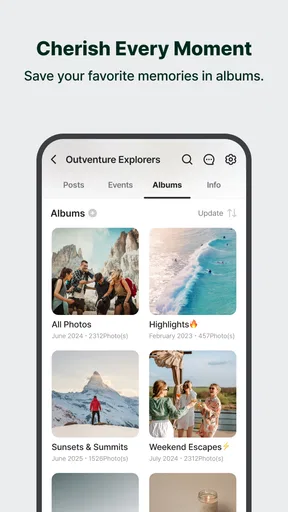
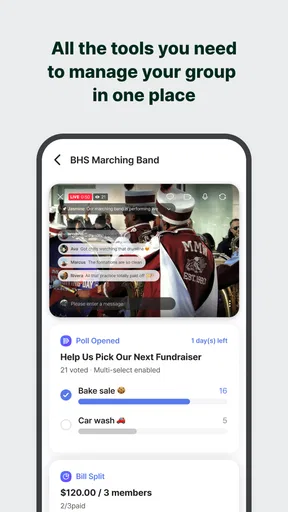
- Members can share photos, videos, files, polls, and schedules in one place.
- Calendar and group activity features make planning meetups more convenient.
- Available on both Android and iOS for easier access across different devices.
Limitations of BAND - App for all groups
- Large groups can become noisy and difficult to navigate without careful organization.
- Some advanced features may feel confusing for first-time users.
- Notification settings require adjustment to avoid receiving too many alerts.
- The app may use considerable storage when groups share many media files.
- Privacy depends heavily on each group’s settings and administrator choices.
Other Releases by NAVER Corp.
View All
네이버 - NAVER
Books & Reference3.5

PRISM Live Studio: Games & IRL
Video Players & Editors4.3
Similar Picks in This Category
View All
Meta Platforms, Inc.4.6

Instagram4.0

Likee-Live, Chat & Party Games
Likeme Pte. Ltd.4.4

Facebook Lite
Meta Platforms, Inc.4.5

TikTok - Videos, Shop & LIVE
TikTok Pte. Ltd.4.0

Moj: Free Short Drama & Reels
ShareChat4.1
Frequently Asked Questions
What is BAND, and who is the app designed for?
BAND is a group communication and organization app designed for teams, clubs, schools, families, sports groups, churches, and communities. After setting up a group, members can share announcements, chat, publish posts, create polls, manage events, and exchange photos or files in one central space. It is especially useful when a group needs more structure than a regular messenger.
Does BAND cost money to download and use?
BAND can generally be downloaded and used without paying for its core communication features. You can create or join groups, post updates, participate in chats, view calendars, and receive notifications at no cost. However, some groups may use optional paid features or collect membership fees independently, so the total cost can depend on how a particular community manages its activities.
Can I use BAND for private groups and control who joins?
Yes. BAND supports private groups, which makes it suitable for groups that do not want their conversations or files to be publicly visible. Group administrators can usually control invitations, approve or remove members, manage posts, and adjust access settings. Before joining or creating a group, it is still worth reviewing the privacy options and administrator permissions carefully.
What features does BAND offer for organizing group activities?
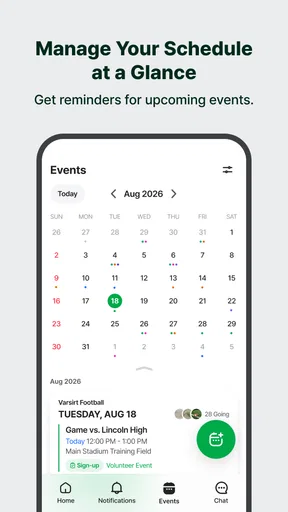
BAND includes several practical tools beyond ordinary messaging. Depending on the group settings, members can use announcements, shared calendars, event reminders, attendance checks, polls, photo albums, file sharing, comments, and group chats. These features make it convenient for coordinating practices, meetings, school activities, trips, family events, or recurring tasks without relying on multiple separate apps.
Is BAND available on both Android and iPhone, and does it require an account?
BAND is available for mobile devices running Android and iOS, and it can also be accessed through supported web options. You normally need to create or use an account before joining groups and participating in conversations. A stable internet connection is required for syncing posts, messages, files, and notifications, while some content may be unavailable when you are offline.
